 Food & Fit
See how your meals line up with how you feel.
A free PCOS food journal for iPhone. Keep your meals, hunger, cravings and energy together, then explore patterns in your own records.
iOS 26.0 or later. No account required. Three free AI estimate sessions each local day.
 Founded by Dr. Loredana Gavrilovici.
Start a PCOS food journal with one meal and one check-in
Keep a record you can return to, without building a new routine all at once.
Write what you ate
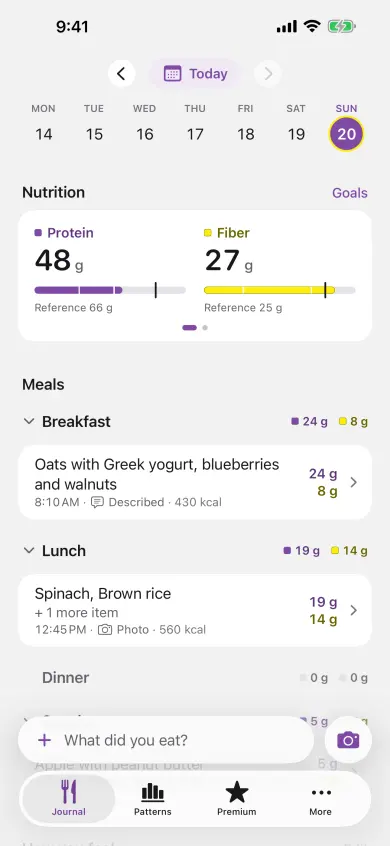
Describe a meal or add a photo. Review the estimate, correct the amount and save it. Protein and fiber appear first.
Record how you felt
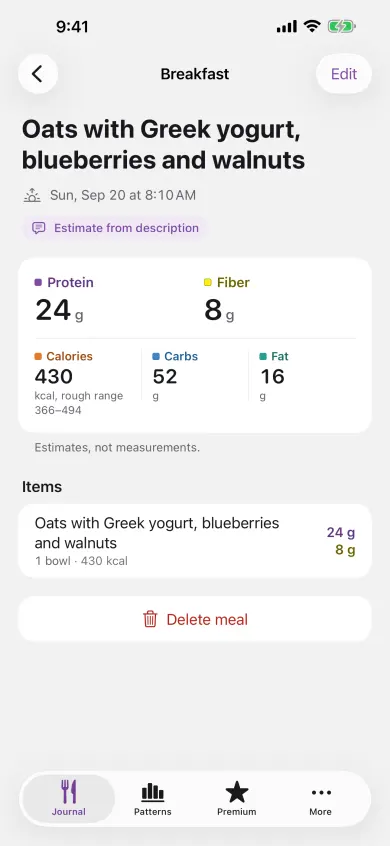
Rate hunger, cravings and energy. Add symptom or period context when it matters to you. Your check-in sits beside that day’s meals.
Look back at your days
Your record is useful from the first day. Pattern questions need at least 21 paired days across three weeks before evaluation can begin; some never qualify for an answer.
I wanted you to have one place for what you ate and how you felt that day.
I started in surgery, in the operating room. Today I’m a pediatric psychiatrist. Caring for patients is why I built Food & Fit.
Here is how you use it. Log a meal with a photo or a sentence. Rate your hunger, cravings and energy in three taps. Then Food & Fit looks for patterns that repeat in your own records.
I built it to record your days and never to grade them. You will find no calorie budget, no score, and no streak. Weight tracking stays off until you turn it on, and your journal stays on your iPhone.
What you do with what you see is up to you.
Dr. Loredana Gavrilovici
Founder, Food & Fit
One meal. One check-in. Your own record.
Here is what that looks like in the app, from logging lunch to looking back at your day. These app screenshots use example journal entries.
Log what you ate
Check in on your day
Keep the day together
Logging that keeps up with a real day
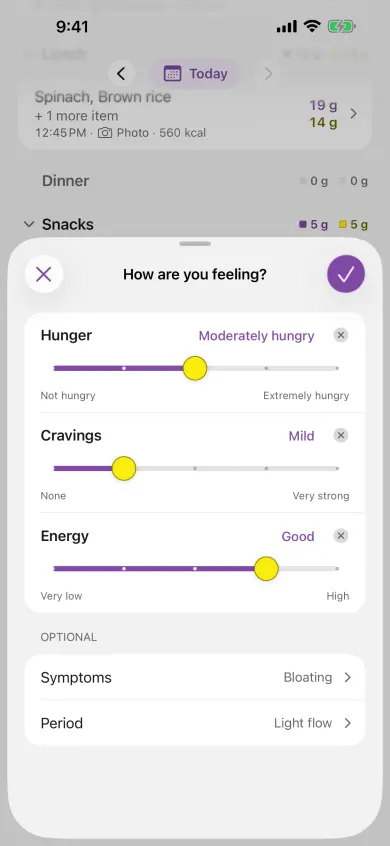
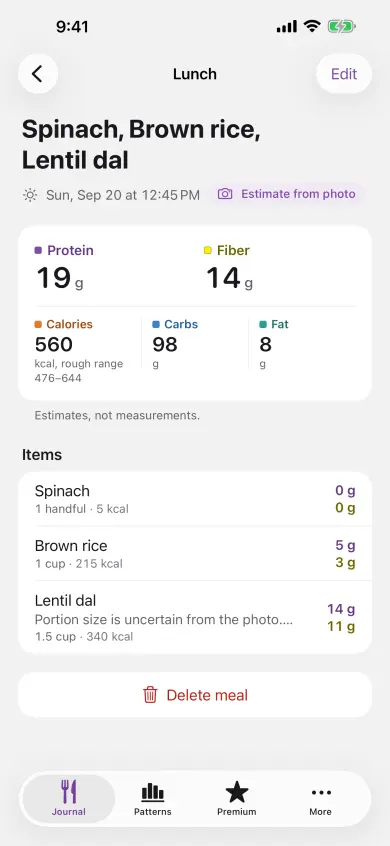
Use the meal bar whenever you eat: write a sentence or add a photo. Food & Fit brings back an estimate with protein and fiber first, then files the meal under breakfast, lunch, dinner or snacks from the time of day.
Every number is ready to edit before or after you save. Your corrections make the record match what you actually ate.
Free includes three AI estimate sessions each local day, enough for breakfast, lunch and dinner. Manual logging of name, amount, protein and fiber has no limit.
A reference for protein and one for fiber
Protein and fiber sit at the top of the Journal, each next to a reference you can edit. Calories, carbohydrates and fat are there too, for context.
The references start with EFSA’s general-adult guidance: 0.83 g of protein per kg of current body weight each day, and 25 g of fiber each day.
Glance at them to read your week. If you follow different guidance, change either number to match it.
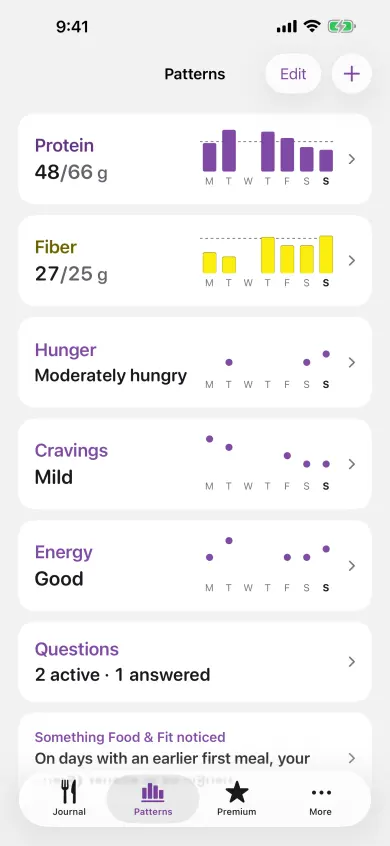
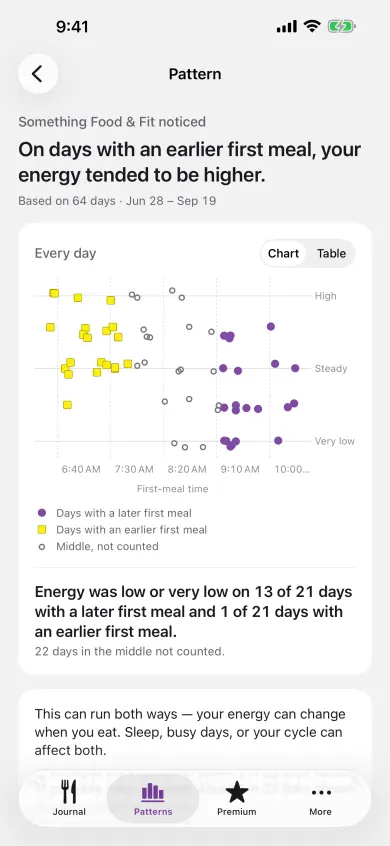
Patterns you can check for yourself
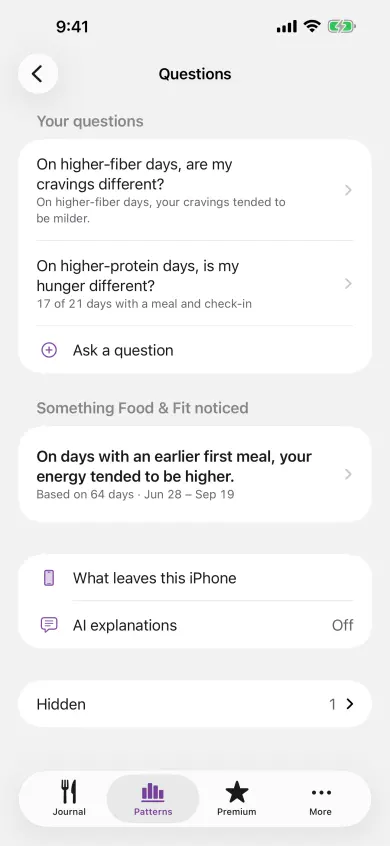
Choose up to three questions from a fixed menu: protein, fiber, carbohydrates, fat, or the time of your first or last meal, against hunger, cravings or energy. Evaluation begins after 21 paired days across three weeks, and answers typically appear after four to eight weeks.
A question earns an answer only after it qualifies twice in the same direction. You see one dot for every day behind it, and the other things that could explain it. Patterns show associations in your own record, not causes or medical advice.
Analysis runs on your iPhone, so the history behind each pattern stays with your journal.
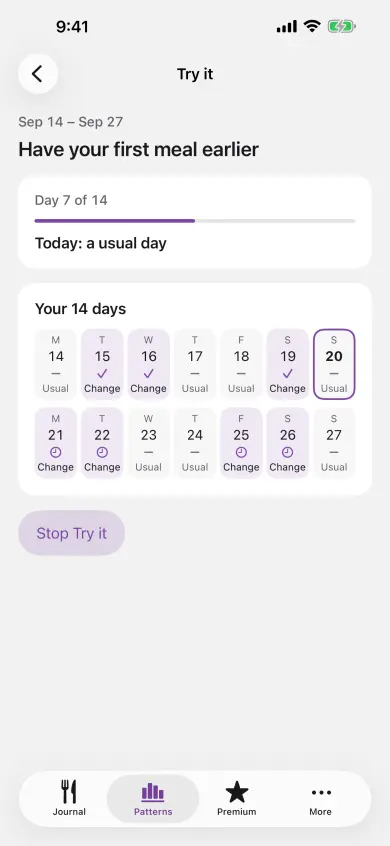
Ask a question. Then look at the days behind it.
Choose what you want to explore. A two-week test helps you record one change without treating it as proof of a cause.
Weight in view
Weight beside your food and feelings, when you choose
Food & Fit is not a weight-loss plan. Weight is off by default, and you can turn it on as one more thing to track.
Track weight, if you want to
Turn on Track weight to log a weight or import it from Apple Health and set your own weight reference. After at least ten weekly pairs, the Weight page can show whether weeks with more protein or fiber went with a lower or higher week-to-week change. It is an association, never a cause.
Appointment prep
With Premium, turn the last 4 weeks, 3 months or 6 months of your records into a one-page PDF to bring to a clinician visit. It is made on your iPhone and goes only where you send it.
Privacy
Your journal, on your device
Private by default
Meals, check-ins and patterns live in Food & Fit’s on-device database until you edit or delete them.
Estimates, on request
Submit a meal for an estimate and its description or photo travels through Cloudflare to OpenAI. The Worker processes it in memory and keeps no application record.
Patterns, on your iPhone
Your iPhone computes patterns, questions and two-week tests from the days in your journal. Product-usage events stay in the device log.
Who it is for
For women with PCOS who want their days to make more sense
Food & Fit is for women aged 18 and over with PCOS who want to see how what they eat lines up with how they feel.
In your first week, log what you eat and check in when it suits you. The Journal fills in day by day.
Start with one meal and one check-in. There is no score to chase and no calorie budget to close.
Questions
Common questions
Is Food & Fit free?
Yes. Free includes three AI meal-estimate sessions each local day, unlimited manual logging of name, amount, protein and fiber, every daily check-in, and all local history and statistics.
What does Premium add?
Premium gives you unlimited AI meal-estimate sessions, adds calories, carbohydrates and fat to manual entry, and unlocks Appointment prep. It costs $12.99 a month, $39.99 a year, or $79.99 once.
Where does my journal live?
Your meals, check-ins and patterns live on your device. When you submit a meal for an estimate, its description or photo goes through Cloudflare to OpenAI.
How fast is logging?
Write a meal in a sentence or add a photo, then review the editable estimate before saving. Both options are in the meal bar on the Journal.
Does it work with Apple Health?
Yes, by category and when you choose. You can connect read access for weight, height and cycle during onboarding, import 30 days of daily aggregates later, import up to 90 days of daily weights while Track weight is on, and write confirmed nutrition back to Apple Health.
Is Food & Fit a weight-loss app?
No. It is a food-and-feeling journal. Weight tracking is optional and off until you turn it on, and there is no calorie budget, weight-loss rate or target date. A calorie reference is optional, and you set it yourself if you want one.
How soon will I see a pattern?
Your week cards start building from day one. A question can begin evaluation after 21 paired days across three weeks, and qualifying answers typically appear after four to eight weeks.
Start with one meal
Log what you just ate and check in tonight. Food & Fit is free on iPhone.