 Food & Fit
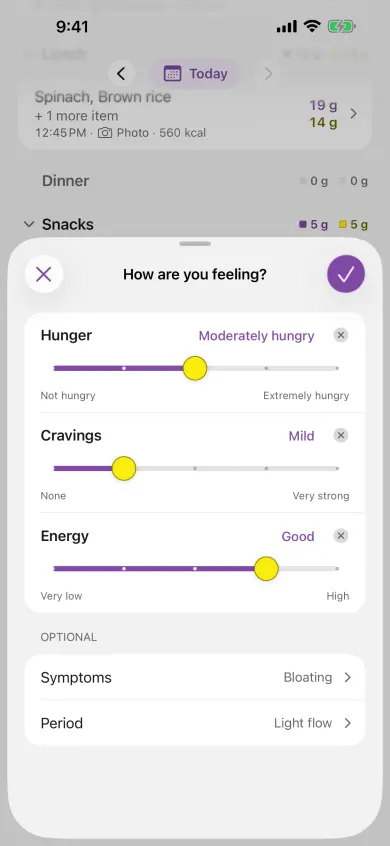
Food & Fit's Daily PCOS Check-In records hunger, cravings and energy in three taps, with optional symptom, medicine and period tags. It keeps each check-in beside that day's meals on your iPhone, so weeks of days can be read together.
A food and symptom record, in the same place
Keep what you ate beside how you felt instead of switching between a meal log and a symptom list. Start with the three ratings; add context only when you want to.
What one day might look like
This is an illustrative entry, not a result from a person using Food & Fit:
- Meal: a description or photo of lunch, with nutrition estimates reviewed before saving.
- Check-in: hunger “Moderately hungry”, cravings “Mild” and energy “Steady”, using your own ratings.
- Optional context: a symptom tag or a period start when you want it in the record.
One day records what happened. Repeated days can support a question about hunger, cravings or energy; symptom tags stay as context rather than evidence that one food caused a symptom.
Why a symptom list alone is hard to read
PCOS shows up differently from one person to the next, and from one week to the next. A note that says “bad cravings today” is useful, but on its own it cannot tell you what else happened that day. Did you eat breakfast? Was it the week before your period? Did you sleep badly?
Food & Fit puts a short daily check-in and your food journal in one place. Each check-in belongs to a day, and each day holds its meals, so you can look back at weeks of days instead of single moments.
What you record
Three ratings
Rate hunger, cravings and energy for the day, each on a five-step scale of words: from “Not hungry” to “Extremely hungry”, “None” to “Very strong”, and “Very low” to “High”. Skip any rating you do not want to give. A skipped rating stays blank and is never filled in for you.
Symptom tags
Add any of bloating, digestive discomfort, headache, skin changes or pelvic discomfort when they were part of the day.
Medicine tags
Note metformin, a GLP-1 medicine, hormonal birth control or another medicine. These are context for your record. Food & Fit never compares medicine days, and when your medicines changed during a pattern’s window, the pattern’s method note says so.
Period context
Mark a period start and its flow: spotting, light, medium or heavy. If you share menstrual flow from Apple Health, Food & Fit can fill this in and tells you where it came from.
Every row after the three ratings is optional. Your check-in is your own observation, kept as you entered it. Food & Fit does not turn it into a score, a cycle prediction or a diagnosis.
Where your check-ins show up
- The Journal shows the day’s check-in under its meals.
- Patterns cards show hunger, cravings and energy for today, this week and longer ranges.
- Your first week, from day 7 to day 28, gives your usual word for hunger, cravings and energy and how many days you checked in.
- Your questions compare a rating with protein, fiber, carbohydrates, fat or meal timing on the same day, once you have at least 21 paired days across three weeks.
- Appointment prep (Premium) counts how many rated days were low, middle or high, and lists symptom, medicine and period-start days.
Symptom tags stay in your record, but they are not used in pattern questions. They are usually recorded on too few days for a fair daily comparison, and a symptom linked to one food would read like a trigger-food claim. Why Food & Fit does not name trigger foods.
Easy to keep up, with no nagging
One optional reminder can arrive at the time and on the weekdays you choose. It has no streaks and nothing from your journal in it. A Home Screen or Lock Screen widget can open the check-in in one tap. If you miss a day, you just check in the next time.
Stored on your iPhone
Check-ins, symptoms, medicines and period context are stored on your iPhone and never leave it. Patterns are calculated on the iPhone too. The only journal content that leaves your device is a meal description or photo you submit for an AI estimate. Read the privacy policy.
Common questions
Is the check-in free?
Yes. Every daily check-in is free, along with all local history and statistics.
Can it tell me if my symptoms are PCOS?
No. The check-in records what you noticed. It does not diagnose PCOS or measure how active it is. For new, severe or changing symptoms, speak with a clinician.
Does it predict my period?
No. It keeps the period starts and flow you enter, so you can see them beside your food and ratings.